
Lightning

Parent to child communication in LWC

For a parent component to communicate with child component, A child component exposes a property or method to make that variable publicly available. Then the parent can update the child’s public property or call child’s function.

To make a property or method public, LWC component will be annotated with @api. To expose a public method, decorate it with @api. Public methods are part of a component’s API. To communicate down the containment hierarchy, owner and parent components can call JavaScript methods on child components.

In the child to parent communication you can see in child component @api childName = ‘’ is declared. This is a small example of Parent to child communication. In parent component, when the child component is called, the @api annotated property is used to send information to child component.

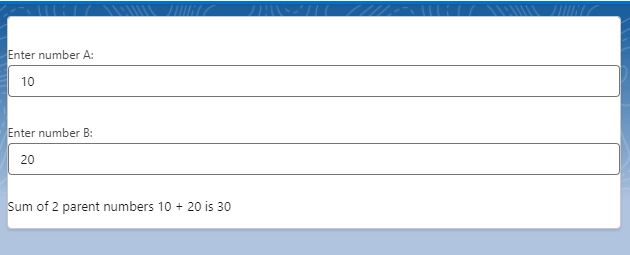
Today we will see how components methods communicate down the hierarchy i.e from parent to child using a small example. We will have 2 numbers in parent component which are passed to child. We will call a child method to add those 2 numbers and display the sum in child component. Just for reference Parent component name is Guru and Child component name is Chela (I have components names parent and child with previous examples).

guru.html (Parent component)

<template>
    <div class="slds-theme">
        <lightning-card  title={childName}>
        <lightning-input type="number"
                         label="Enter number A:"
                         value={value1}
                         onchange={handleValue1Change}
        ></lightning-input>

        <br/>

        <lightning-input type="number" 
                         label="Enter number B:"
                         value={value2}
                         onchange={handleValue2Change}
        ></lightning-input>

        <br/>

        <c-chela value1={value1} value2={value2}></c-chela>
        </lightning-card>
    </div>
</template>

guru.js (Parent component)

import { LightningElement } from 'lwc';

export default class Guru extends LightningElement {
    value1 = 0;
    value2= 0;

    handleValue1Change(event){
        this.value1 = event.target.value;
        this.template.querySelector('c-chela').addNumbers();

    }

    handleValue2Change(event){
        this.value2 = event.target.value;
        this.template.querySelector('c-chela').addNumbers();
    }
}

Here, We have mentioned the child component in parent component and chela.js (Child component) and if you see this.template.querySelector(‘c-chela’).addNumbers(); in guru.js file, we are calling chela component’s addNumbers method from parent component guru.js

chela.html (Child component)

<template>
    <div class="slds-theme">
        Sum of 2 parent numbers {value1} + {value2} is {sum}
    </div>
</template>

chela.js (Child component)

import { LightningElement, api } from 'lwc';

export default class Chela extends LightningElement {

    @api value1 = 0;
    @api value2 = 0;
    sum = 0;

    @api 
    addNumbers(){

        setTimeout(() => {
            // adding 2 parent component numbers value1 and value2
            this.sum = parseInt(this.value1) + parseInt(this.value2); 
        }, 300);

    }
}

Output:
Lightning

Child to Parent Communication in LWC

For a child component to communicate with parent component, A child component dispatches a custom event that triggers an update in the parent component. While sending an event to parent component, you can choose to send data and you can allow the event to bubble up through DOM. Along with an event, you can send custom information and make use of that information to update something.

Parent to Child communication

If you have used custom lookup component in LWC, this component works on Child to Parent communication, where a user selected record is dispatched as an event to parent component where it is captured and shown as a pill. This is just a small example.

In this blog we will see how to use the custom event method with a small example.

We have 2 components here

1)Parent component
2)Child component

parent.html

<template>
    <lightning-card  title="Hello this is Papa Cpmponent">
        
        <p class="slds-p-horizontal_small">
            <lightning-input  type="text" label="Name" value={Name} read-only="true" ></lightning-input>
            <lightning-input  type="text" label="Actor" value={Actor} read-only="true" ></lightning-input>
            <lightning-input  type="text" label="Movie" value={Movie} read-only="true" ></lightning-input>
            <lightning-input  type="text" label="Punchline" value={Punchline} read-only="true" ></lightning-input>

        </p>

        <div slot="footer">
            <div class="slds-grid slds-gutters">
                <div class="slds-col">
                    <c-child-comp child-name="Raju" oncharacterinfo={handle_Details}> 
                    </c-child-comp>
                </div>
                <div class="slds-col">
                    <c-child-comp child-name="Vicky" oncharacterinfo={handle_Details}> 
                    </c-child-comp>
                </div>
                <div class="slds-col">
                    <c-child-comp child-name="Baburao" oncharacterinfo={handle_Details}> 
                    </c-child-comp >
                </div>
              </div>
        </div>
    </lightning-card>
</template>

parent.js

import { LightningElement } from 'lwc';

export default class Papa extends LightningElement {
    Name;
    Actor;
    Movie;
    Punchline;

    handle_Details(event){
        
        console.log(JSON.stringify(event.detail));
        
        this.Name = event.detail.a_Name;
        this.Actor = event.detail.a_Actor;
        this.Movie = event.detail.a_Movie;
        this.Punchline = event.detail.a_Punchline;

        console.log ('-=-= name: '+this.Name);
        
    }
}

If you observe papa.html file. I have used a lightning card, with body and footer.

The body part will only display details that we receive from child component

Footer part has child components which is used 3 times representing 3 different movie character.

childComp.html

<template>
    <lightning-card  title={childName}>
        
        <lightning-button 
            variant="brand"
            label="Check Details" 
            onclick={handleClick} 
        ></lightning-button>
        
    </lightning-card>
</template>

childComp.js

import { LightningElement,api } from 'lwc';

export default class ChildComp extends LightningElement {
    @api childName = '';
        
        Name = '';
        Actor = '';
        Movie = '';
        Punchline = '';
    
        handleClick(event){
            console.log('child click event: '+event);


            switch (this.childName) {
                case 'Raju': 		
                    
                this.Name = 'Raju';
                this.Actor = 'Akshay Kumar';
                this.Movie = 'Hera Pheri';
                this.Punchline = 'Paisa hi paisa hoga!';
                
                break;
    
                case 'Vicky': 	
                    
                this.Name = 'Vicky Chopra';
                this.Actor = 'Amitab Bachchan';
                this.Movie = 'Sharabi';
                this.Punchline = 'Mooche Ho Toh Nathulal Ji Jaise Ho... Varna na ho';
                    
                break;
            
                case 'Baburao': 		
                    
                this.Name = 'Baburao Ganpatrao Apte';
                this.Actor = 'Phir Paresh Rawal';
                this.Movie = 'Hera Pheri';
                this.Punchline = 'Uthala le re baba';
                    
                break;
                
                default: 
    
                break;
                
            }
    
            console.log('-=-= in child: '+this.Name);
            console.log('-=-= in child: '+this.Movie);
            console.log('-=-= in child: '+this.Actor);
            console.log('-=-= in child: '+this.Punchline);
    
            const a_Name = this.Name;
            const a_Movie = this.Movie;
            const a_Actor = this.Actor;
            const a_Punchline = this.Punchline;
    
            const selectedCharacter = new CustomEvent('characterinfo', {
                detail: {
                    a_Name,
                    a_Movie,
                    a_Actor,
                    a_Punchline
                },
            });
            this.dispatchEvent(selectedCharacter);
    
        }
}

If you see child component’s html part. I have just added a button to click and get details.

In childComp.js file, button click event, Based on name of the child component, details will be fetched using switch statement.

This is the place where you can add custom code and make some server calls to get any other details as per requirement.

I have used a constant called selectedcharacter which is a custom event.

const selectedCharacter = new CustomEvent('characterinfo', {
                detail: {
                    a_Name,
                    a_Movie,
                    a_Actor,
                    a_Punchline
                },
            });
            this.dispatchEvent(selectedCharacter);

here, if you observe ‘characterinfo’ that is the event name, you can replace it with any character that you want. Any name that you use in child component, in parent you must have an on as an event

If you observe how the component is called in parent component,

<c-child-comp child-name="Raju" oncharacterinfo={handle_Details}> 
                    </c-child-comp>

name of the component is saved as childComp. while using the component in a parent component, there will be no CAPITAL case for any character, if there is a Capital case, it will be replaced with -<small case of same character>. In above example, childComp, here C is capital so while using in parent compnent, we have to mention -c. that is the reason we have used <c-child-comp >

oncharacterinfo ={handle_Details} is used for custom event details. If you use custom event as moviecast, then in parent component you must use onmoviecast as event name and call a method to handle that event.

If you observe the child component, you see detail as a variable, this is a event property, you can also use details as event property. Please note, you cannot use any other variable, you have to be specific and it should be one of the property of event.

Output

Lightning

Communication Between Components using LWC

There will be multiple scenarios where developers work with multiple components, including nested components within a component. It’s important to understand how components communicate with each other. Each component is a separate entity with its own variables, events, HTML design, and the ability to communicate with the server (APEX) individually. However, it’s crucial to note that in certain situations, components need to communicate with each other. This approach can save processing time by preventing each component from making a server call every time there is a change in data.

A component within a component creates a parent-child relationship. How a parent component communicates with a child component is completely different from how a child communicates. And both are completely different from how unrelated component communicates.

There are 3 different types of communication that we come across.

1) Child to Parent Communication
2) Parent to Child Communication
3) Unrelated components (Separate components).

We will discuss all the scenarios with examples.

1) Child to Parent Communication

For a child component to communicate with parent component, A child component dispatches a custom event which will trigger an update in the parent component.

2) Parent to Child Communication

For a parent component to communicate with child component, A child component exposes a property or function to make that variable publicly available. Then the parent can update the child’s public property or call child’s function.

3) Unrelated components (Separate components).

To communicate across subtrees in a DOM we use a concept called Lightning Message Service(LMS).

Note:

Trailhead : Communicate Between Lightning Web Components

Lightning

Events in Lightning Component and Visualforce page using Lightning Message Service (LMS)

Events in Lightning Component and Visualforce Pages using Lightning Message Channel

Consider a scenario where you are working on multiple components and in which there are Visualforce pages, Lightning Aura Components, Lightning Web Components. We know that we have Lightning Aura Events (Application Event and Component Event) which works in Lightning Aura Component. But what if there is a scenario where you want to send an event across component whether it is between Aura Component or a Web Component or a Visualforce page. Or combination of all three.

Salesforce has introduced Lightning Web Component Message Service (lightning-message-service). It is used to communicate across the DOM between Visualforce pages, Aura components, and Lightning web components, including components in a pop-out utility bar. To communicate across DOM there should be a channel. And salesforce has provided Lightning Message Channel to communicate.

Continue reading “Events in Lightning Component and Visualforce page using Lightning Message Service (LMS)”